Writing
使用 UITableView.allowsFocus 解決 UITableView 和 SwiftUI 混寫的焦點錯誤對焦的問題
SwiftUI,UIKit,tvOS · 2024-09-21 · Updated 2026-04-26
這是一個在 tvOS 上混用 SwiftUI 與 UITableView 時,因為 SwiftUI 的焦點預測機制與實際列表高度不一致,導致焦點錯位,最後必須直接接管 UITableView Focus 系統才能解決的實戰案例。
錯誤回顧
https://prod-files-secure.s3.us-west-2.amazonaws.com/7cffb4a2-dac8-458f-bc10-c219eb726bb5/51f1ce04-4e19-430f-b37b-79d2909562d1/IMG_1351.mov
代碼
    @ViewBuilder func ListView() -> some View {
        CocoaList(data.epsList) { ep in

            UniversalEpView(ep: ep)
                .frame(width: 1120)
                .fixedSize(horizontal: false, vertical: true)
                .id(ep.id)
                .focused($focusedField, equals: .equalsID(ep.id))

            if data.epsList.last == ep && data.epsList.count > 1 {
                BackTopBar()
                    .padding(.top, 20)
            }
        }
        .alwaysBounceVertical(true)
        .introspectTableView { tableView in
            self.tableView = tableView
            tableView.delegate = delegateHandler
            tableView.allowsFocus = false
            tableView.allowsSelection = true
            tableView.isPrefetchingEnabled = true
            tableView.rowHeight = UITableView.automaticDimension
            tableView.estimatedRowHeight = 108
        }
    }
在源代碼中,我使用了 CocoaList(基於 UITableView 的封裝)來實現播放列表的 UI。
然而,在這份代碼上,SwiftUI 並不會真實滾動這個 UITableView。
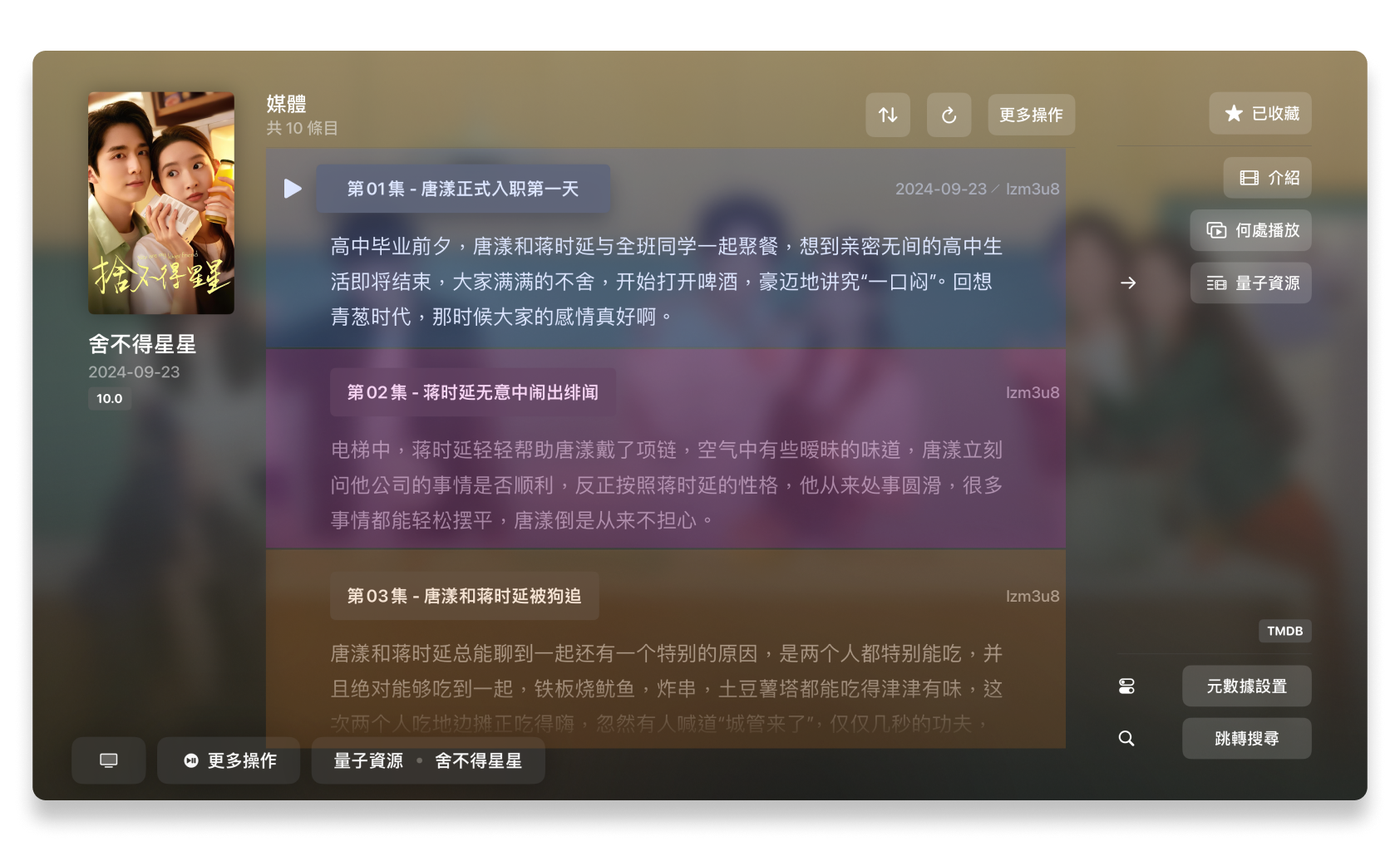
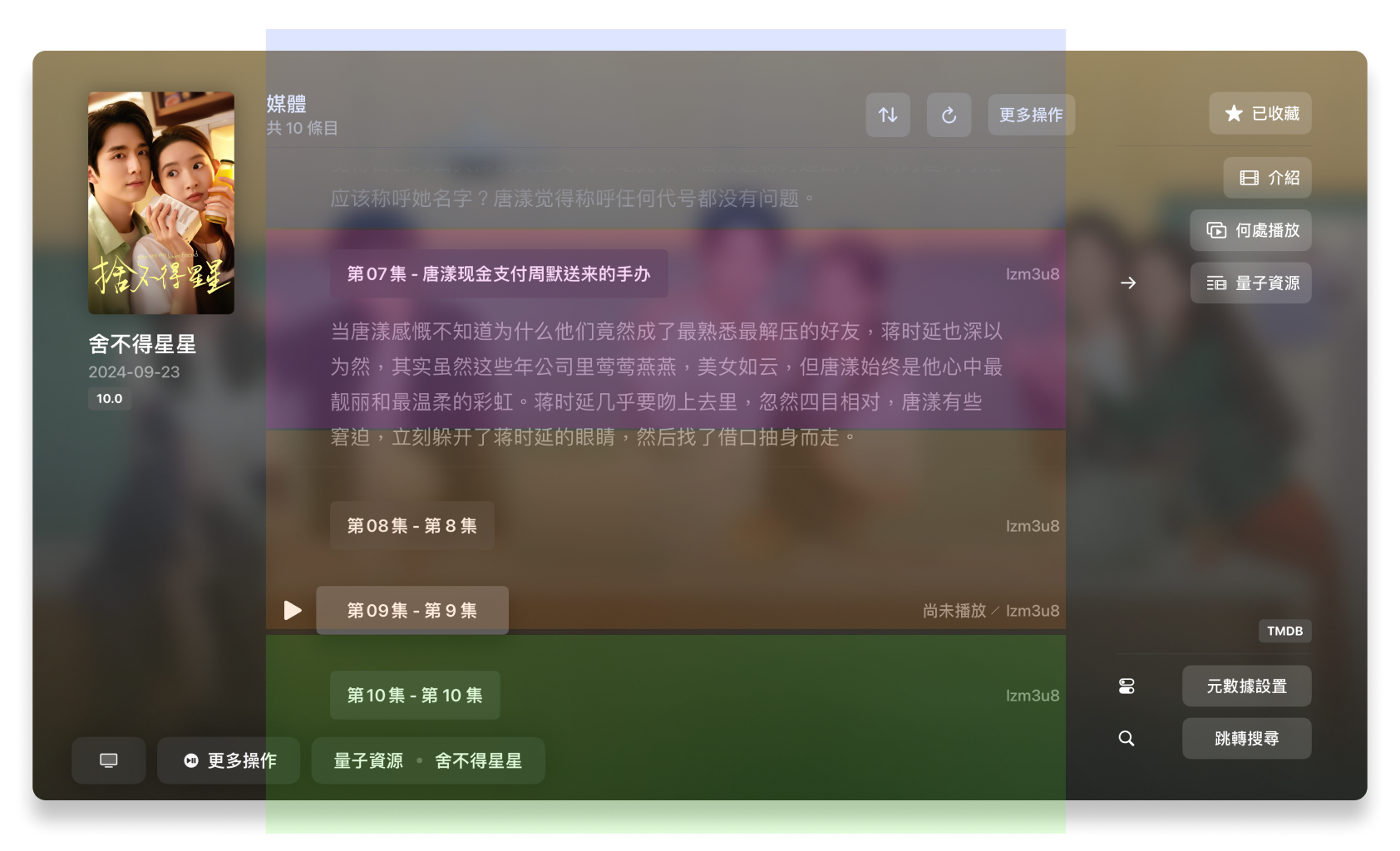
然而,在這樣編寫的 CocoaList 會一直使用這樣的列表出現在第一屏幕(圖片1)進行後續的焦點預測*。所以,在後續高度不一致的 CELL 上,那麼就會出現焦點對齊錯誤的問題。
* 焦點預測:我猜測 SwiftUI 對 UITableView (List) 實現的一種優化手段。
在 os15 版本,List 的背後實現是 UITableView。
在 os16+ 版本,List 的背後實現是 UICollectionView。
解決辦法
為了解決這個問題,我們有兩個方法。
- 更新到 xcode 16 並重新編譯 app。(我不太清楚這是否真實的辦法,不過此 Bug 目前無法重現在我經過 xcode 16 編譯的 app 版本下出現。)
- 使用 UITableView 裡面的 allowsFocus 功能來接管 SwiftUI 的焦點管理。
使用 UITableView 裡面的 allowsFocus 功能來接管 SwiftUI 的焦點管理
    @State var listFocusedIndex: Int?
    @State private var delegateHandler = TableViewDelegateHandler()
    @State var tableView: UITableView? = nil

    @ViewBuilder func ListView() -> some View {
        CocoaList(data.epsList) { ep in
            CocoaListEpView(ep)
        }
        .alwaysBounceVertical(true)
        .introspectTableView { tableView in
            self.tableView = tableView
            tableView.delegate = delegateHandler
            tableView.allowsFocus = true //這樣就會使用 UITableView 的 Focus 功能來處理焦點
            tableView.allowsSelection = true
            tableView.isPrefetchingEnabled = false
            tableView.rowHeight = UITableView.automaticDimension
            tableView.estimatedRowHeight = 108
        }
        .onReceive(delegateHandler.$focusedIndex) { index in
            self.listFocusedIndex = index
        }
        .onReceive(delegateHandler.$didSelectRowAt) { index in
            Task { @MainActor in
                await self.playEp(by: index)
            }
        }
    }

    // Cocoa CELL
    @ViewBuilder func CocoaListEpView(_ ep: UniversalEpisodes.ep) -> some View {
        CocoaEpView(
            ep: ep,
            epIndex: getEpIndex(ep) ?? 0,
            selectIndex: $listFocusedIndex
        )
        .frame(width: 1120)
        .fixedSize(horizontal: false, vertical: true)
        .id(ep.id)
        .introspectTableViewCell { cell in
            cell.focusStyle = .custom
            cell.selectionStyle = .none
            cell.backgroundColor = UIColor.clear
        }
    }
//
// TableViewDelegateHandler.swift
// SyncNext
//
// Created by 黃佁媛 on 2024/7/15.
//
import Foundation
import SwiftUI
import UIKit
class TableViewDelegateHandler: NSObject, UITableViewDelegate, ObservableObject {
@Published var focusedIndex: Int? = nil
@Published var didSelectRowAt: Int? = nil
func tableView(_ tableView: UITableView, didUpdateFocusIn context: UITableViewFocusUpdateContext, with coordinator: UIFocusAnimationCoordinator) {
if let nextIndexPath = context.nextFocusedIndexPath {
focusedIndex = nextIndexPath.row
} else {
focusedIndex = nil
}
}
func tableView(_ tableView: UITableView, didSelectRowAt indexPath: IndexPath) {
didSelectRowAt = indexPath.row
}
}
在代碼中把 UITableView 的 tableView.allowsFocus 設定為 true 即可。
然後,使用 introspectTableViewCell 來使 CELL 的焦點樣式設定為不可見,這樣,就可以自定義焦點樣式了。
那麼,SwiftUI 就不會對此區域產生焦點處理。
然而,這樣改造後,我們還需要把當前 tableView 所在焦點位置告知 SwiftUI 的 CELL(參考 CocoaListEpView 代碼段落)即可。
解決效果
https://prod-files-secure.s3.us-west-2.amazonaws.com/7cffb4a2-dac8-458f-bc10-c219eb726bb5/09a5acf7-69d2-404d-8f89-94f057f0d307/Simulator_Screen_Recording_-_17.5_-_2024-09-27_at_11.35.18.mp4
其他內容
CocoaList 是我使用 SwiftUIX 提供的 UITableView 封裝。