Writing
使用 Apple 捷徑方便使用 Windows 功能
Windows,Shortcut,Automation · 2024-09-28 · Updated 2026-04-26
概述
- 完成 Windows 的 OpenSSH 伺服器功能
- 執行指定的 Powershell 腳本。
使用效果
Video from the original Notion note
https://prod-files-secure.s3.us-west-2.amazonaws.com/7cffb4a2-dac8-458f-bc10-c219eb726bb5/12e08b72-d9d0-4f07-8073-5b43e2f6ef29/%E8%9E%A2%E5%B9%95%E9%8C%84%E8%A3%BD_2024-09-28_%E4%B8%8A%E5%8D%8811.57.36.mov
STEP 01 - 啟用 OpenSSH 的伺服器功能
參考文檔:https://gist.github.com/teocci/5a96568ab9bf93a592d7a1a237ebb6ea
安裝 OpenSSH Server
Add-WindowsCapability -Online -Name OpenSSH.Server*我推薦使用 Powershell 直接安裝即可。
驗證安裝結果
Get-Service -Name *ssh*PS C:\Users\Qoli\ps1> Get-Service -Name *ssh*
Status Name DisplayName
------ ---- -----------
Stopped ssh-agent OpenSSH Authentication Agent
Stopped sshd OpenSSH SSH Server看到存在上述兩個服務即可。
設定服務為自動啟動
Start-Service sshd
Set-Service -Name sshd -StartupType 'Automatic'

Start-Service 'ssh-agent'
Set-Service -Name 'ssh-agent' -StartupType 'Automatic'
允許通過防火牆
New-NetFirewallRule -Name sshd -DisplayName 'OpenSSH Server (sshd)' -Enabled True -Direction Inbound -Protocol TCP -Action Allow -LocalPort 22STEP 02 - Powershell 腳本
param (
    [string]$url = "about:blank"
)


$taskName = "temp"
$command = "C:\Windows\System32\cmd.exe /c start msedge $url"

schtasks /Create /F /tn $taskName /tr $command /sc once /st 00:00:00
schtasks /run /tn $taskName
schtasks /delete /F /tn $taskName
param (
[string]$command
)
if (-not $command) {
Write-Host "Please provide a PowerShell command."
exit
}
$taskName = "temp"
$escapedCommand = $command -replace '"', '\"'
$scheduledCommand = "powershell.exe -ExecutionPolicy Bypass -Command $escapedCommand"
schtasks /Create /F /tn $taskName /tr "$scheduledCommand" /sc once /st 00:00:00
schtasks /run /tn $taskName
schtasks /delete /F /tn $taskNameAttachment from the original Notion note
https://prod-files-secure.s3.us-west-2.amazonaws.com/7cffb4a2-dac8-458f-bc10-c219eb726bb5/11fa242a-7310-4bf6-a208-ff9cf1e54a32/ps1.zip
或者直接下載 zip,內容為上述兩個腳本。
STEP 03 - 編寫捷徑
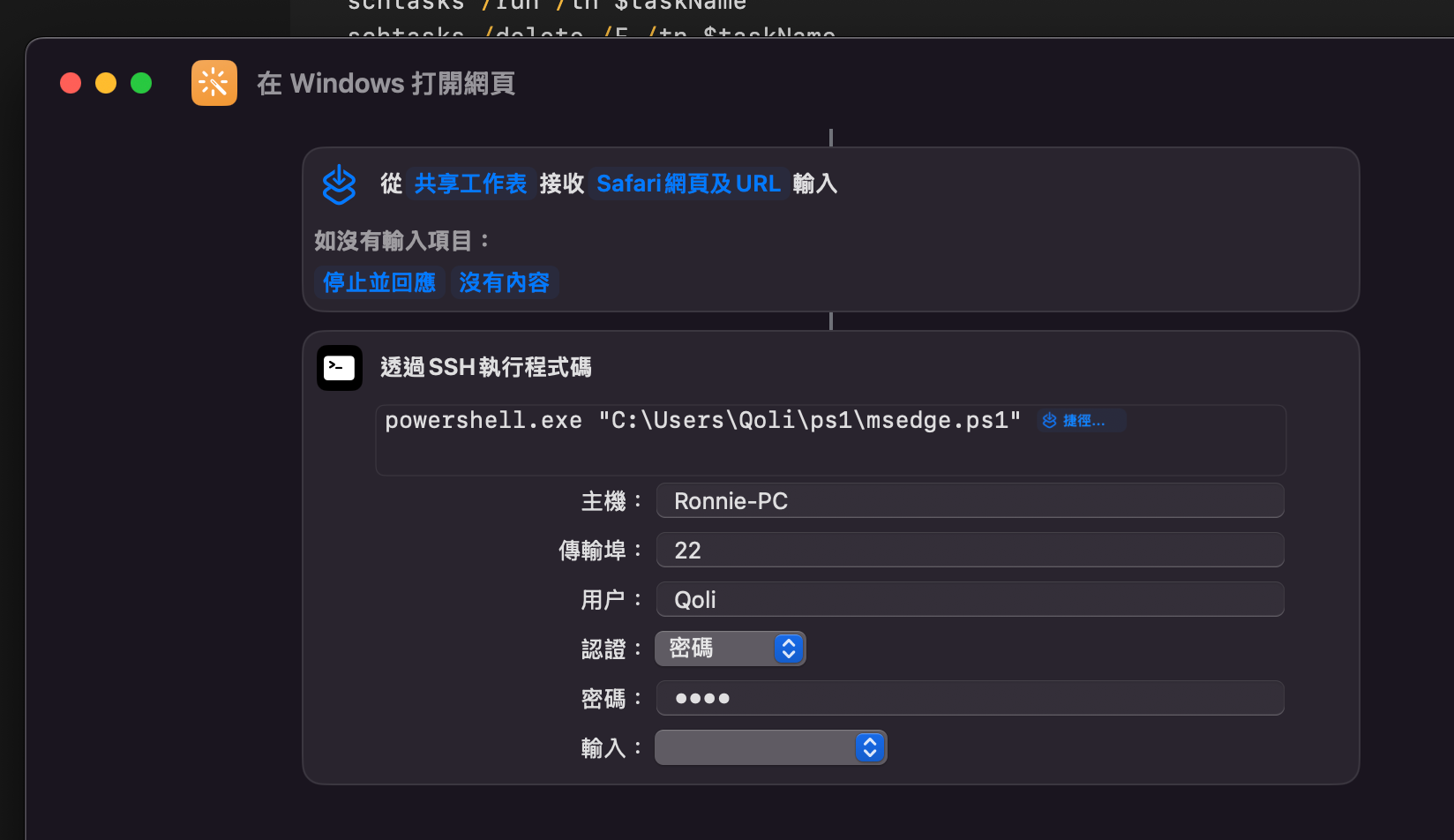
powershell.exe "C:\Users\Qoli\ps1\msedge.ps1" 捷徑輸入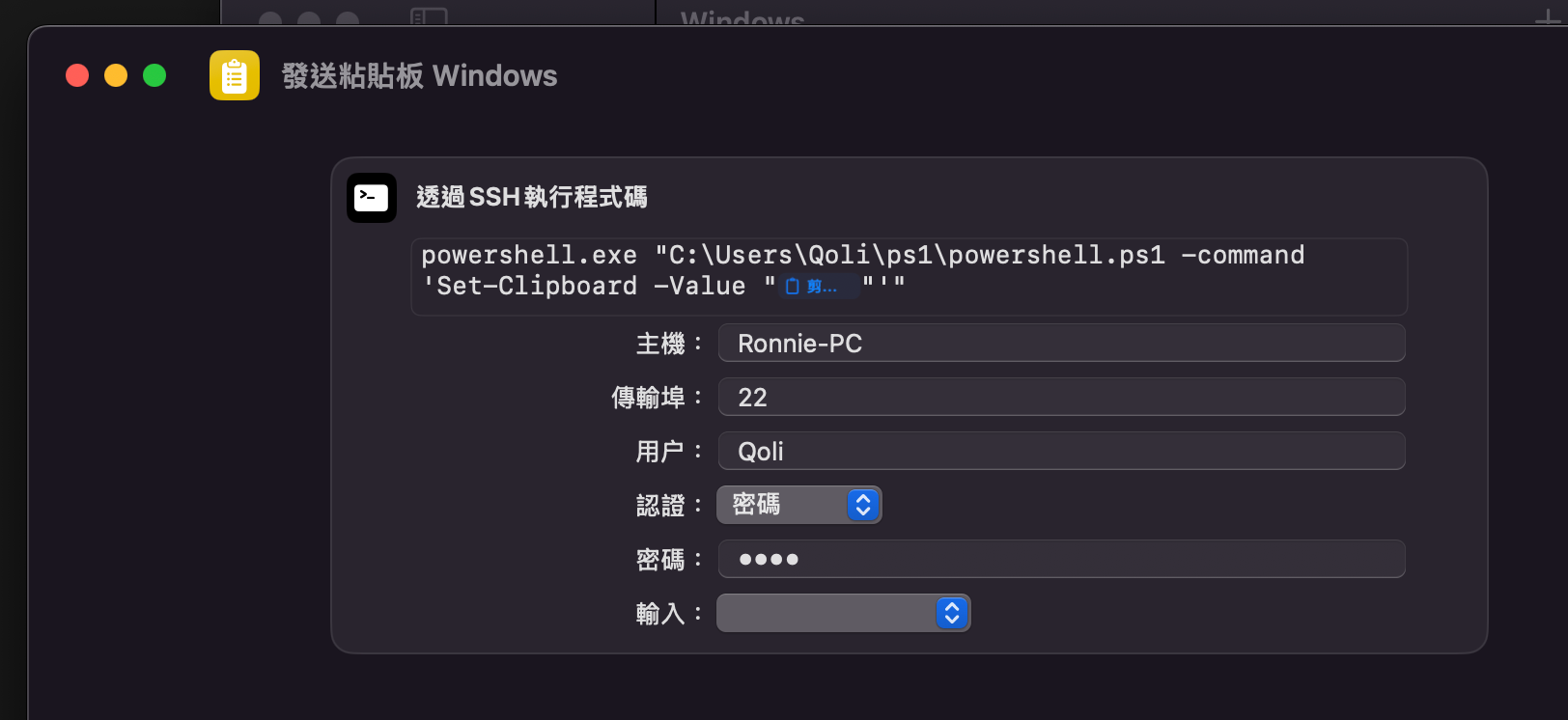
powershell.exe "C:\Users\Qoli\ps1\powershell.ps1 -command 'Set-Clipboard -Value "剪貼板"'"